
Digital Twin
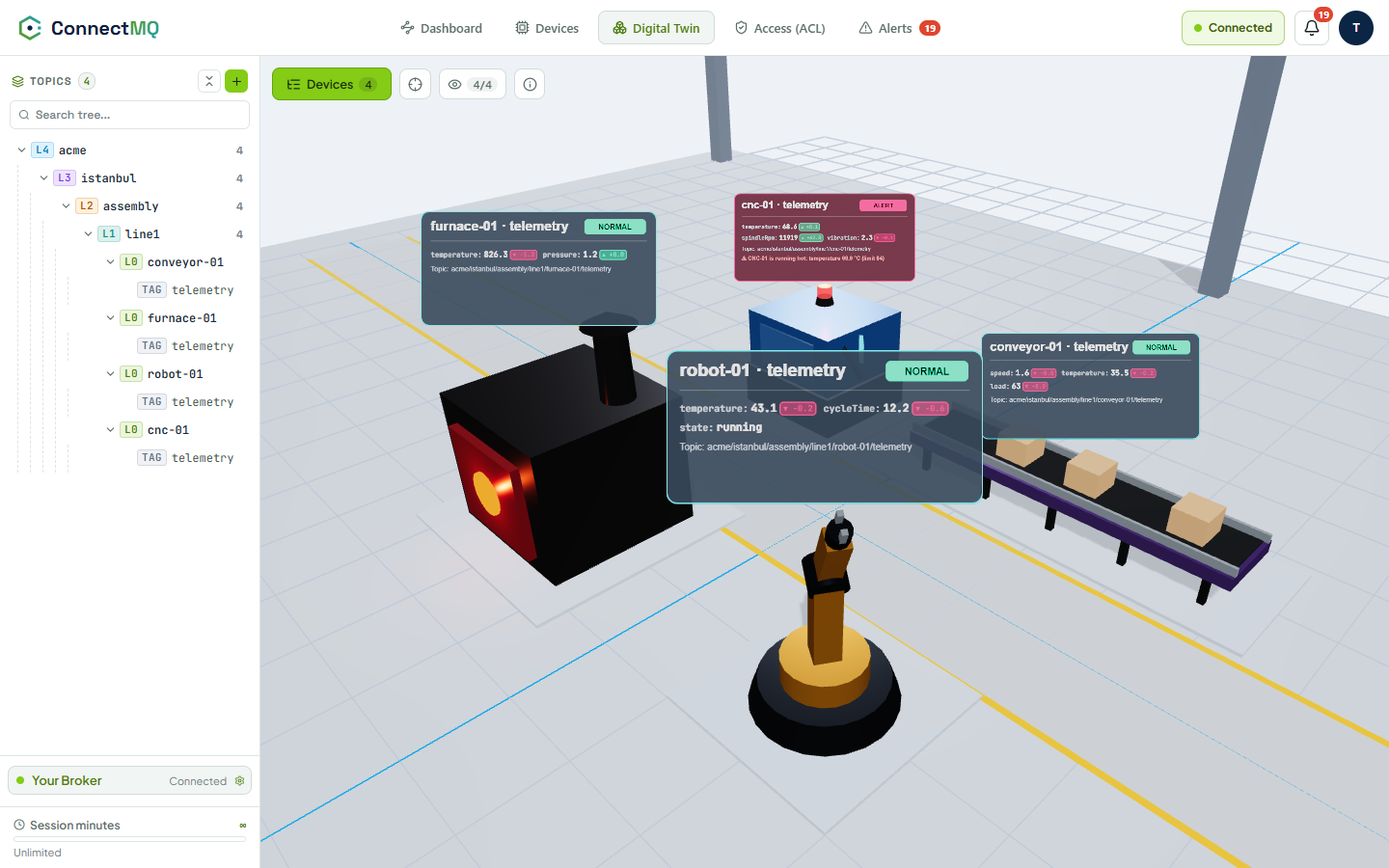
The Digital Twin turns your topics into components of a 3D scene, with their live values and alert status. It works on every plan and needs no modelling.
How it works
- Every topic is a component. ConnectMQ places one component per topic in the scene and shows its latest values in a label.
- The scene follows your use case. An Industrial IoT organization gets a factory floor with CNC machines, robot arms, furnaces, tanks, conveyors and pumps; other use cases have their own scenes and device types. Change the use case under Tenant & Billing Settings.
- The type is chosen automatically from the topic and payload (for example
cnc-01becomes a CNC machine,robot-01a robot arm). You can change it. - Alert state is live. A component shows NORMAL, WARNING or ALERT; in the example above
cnc-01is in ALERT because its temperature rule fired.
Navigate the scene
| Action | How |
|---|---|
| Rotate | Drag |
| Zoom | Mouse wheel |
| Pan | Right-drag |
| Move a component | Drag it |
| Select a component | Click it |
| Reset the camera | Reset view (crosshair button) |
Toolbar
- Devices: the level navigator. Browse the ISA-95 levels, frame the components of a level, and see which are In scene, Has alert or Hidden.
- Eye (for example
4/4): choose which topics are shown. Search by topic or component type, Show all, Hide all, or Show in 3D / Hide from 3D per topic. - (i): help.
Clicking a topic in the sidebar while the twin is open selects its component instead of leaving the page.
Selected component
Click a component to open its panel: status, details, a min/max chart, Open topic, unacknowledged alerts with Acknowledge, and Change Device Type (or Automatic) to pick a different model.
Owners and admins can change the layout and component types; members can view.
Tips
- Use one topic per machine (
.../cnc-01/telemetry) with all its values in one JSON object; each topic becomes one component. - Add alert rules to make problem machines stand out in the scene.
- Changing the use case clears the twin's type assignments, visibility and layout (not your topics or messages).